

Session checklist
Set the world rules before using the mode guide, dedicated-server setup or shared storage advice.
One world supports up to four players and can be solo, friends-only or public. Decide the host and access mode before gathering rare materials. A friends-only world is the safer default for a planned group; use public access only when the host accepts unknown players and has separated shared supplies from quest-critical items.
Start the intended world, send the invite, and verify that the joining player can interact with a harmless object. Then leave and rejoin to check persistence. If the session fails, test a new world and remove mods before changing network settings. The useful completion signal is that the same players can rejoin the same save and see the expected inventory, base and quest state.
Agree on world ownership before the first expedition
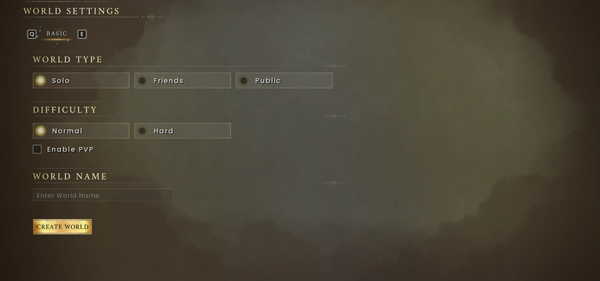
A world holds up to four players and can be solo, friends-only or public. Set the access mode before building, then agree on who owns the world, where shared storage lives and which player carries rare quest items.
For a co-op session, divide tasks by the next completion signal: one player gathers, one keeps the processing loop active and one scouts the return route. Rejoin at a named landmark rather than assuming everyone sees the same marker. Before a boss or region gate, confirm that all players have food, repair access and a recovery route. This prevents a disconnect or host change from turning a recoverable mistake into lost progress.
Define the session contract before inviting players
Before starting co-op, decide who owns the world, how others join, how progress is saved, what happens when the host leaves and where shared resources are stored. Set the world to solo, friends-only or public intentionally, then test one join and one reconnect before a long expedition. In a four-player world, assign simple first-route roles—scout, gatherer, processor and combat support—so the group does not consume the same limited materials or leave the base unattended.
At the start of each session, agree on the objective, return landmark and recovery rule. Keep quest-critical items with the player who owns the active step, and put shared materials in a labelled container. Before a boss or region gate, confirm that everyone has the required food, gear, repair access and route home. If someone disconnects, stop spending rare materials until the host and world state are confirmed.
What a co-op session must decide first
A world supports up to four players with solo, friends-only and public or community access. Decide the save owner, access mode, crossplay state, return point and shared-storage rule before the group starts building. Owning the game is not enough to join if the world is private or the host is unavailable.
For a clean first session, have one player create the world, invite one guest, place a small shared storage point and leave/rejoin once before the whole group commits rare materials. Record the world name and next objective. If only one player cannot join, compare access mode, platform entitlement and crossplay before rebuilding the world.
If your friend cannot join, check these in order
- Confirm the host is online in the intended world and the world is not set to solo or private.
- Confirm the host has the expected platform/account access.
- Try one clean join without optional mods, then test one harmless interaction after joining.
- Leave and reconnect once before starting a long expedition. If this works, the problem is more likely a session setup or mod mismatch than a lost save.
The host owns the practical continuity of the session: keep the world name, next objective and shared-storage rule visible to the group. If the host cannot return, do not assume another player has automatically inherited the same progression state.
The group is ready for a long session when
The group is ready when everyone agrees on world ownership, roles, storage, quest-item responsibility and recovery after a disconnect. Test joining, completing one small objective, leaving and reconnecting before committing to a long session.